Everything you need to know about the Bluebook SAT app: how many practice tests are included, how to download and set it up, what the in-app tools do, and how to get more out of your prep than Bluebook alone can give.
Digital SAT Practice: Bluebook offers four full-length, adaptive free SAT practice tests, simulating the actual test experience, including identical interface and scoring.
Learning Tools: Access video lessons, flashcards, and study guides to supplement your SAT prep and strengthen your skills in key areas.
Performance Analytics: Track your progress with detailed performance breakdowns to identify strengths and areas for improvement before test day.
Over 2 million students took the SAT in 2025. And 100% of them used the Bluebook SAT app.
The Bluebook testing app is the official app through which to take the digital SAT. Your scores on the SAT test day significantly depends upon how you’ve leveraged the app. So how can you use the Bluebook app to practice for the digital SAT? What does the app contain? Where can you download it from?
In this guide, you will:
Learn how to use the Bluebook app strategically - not just to take the test, but to improve your score
Find a brilliant (and free) SAT resource that mirrors the real exam format and scoring, and
Get answers to all the important Bluebook FAQs.
What Is the Bluebook SAT App?
The Bluebook SAT app is the official digital testing platform for administering the Digital SAT. Developed by the College Board, the app provides full-length adaptive practice tests, preview questions, score reports, performance analytics, and study tools to help students prepare effectively.
Here is a quick overview of Bluebook:
You can take the SAT only through the Bluebook, and not otherwise.
You need to download the Bluebook app on the device which you plan to take the SAT on.
There are certain system requirements for the device where you’ll download the SAT.
You need to download it beforehand, and not at the time of taking the actual SAT.
It has questions from previous SATs that you may practise upon.
Is the Bluebook App Free?
Yes, the Bluebook app is completely free, for both download and for your use. You may download and use it on devices specified by the College Board.
Does Bluebook Work for AP Exams Too?
Yes, the Bluebook is the official app for digital AP exams too. However, whether you take the AP exam entirely on the Bluebook app or partly depends upon the subject. Some subjects (e.g. AP Human Geography) allow responses to both multiple-choice and free-response questions to be entered in the app. Other subjects (e.g. Calculus) require that you enter the multiple-choice response in the Bluebook app while you write the free-response answer in the answer booklet that the exam proctor provides you with.
What Devices Support the Bluebook App?
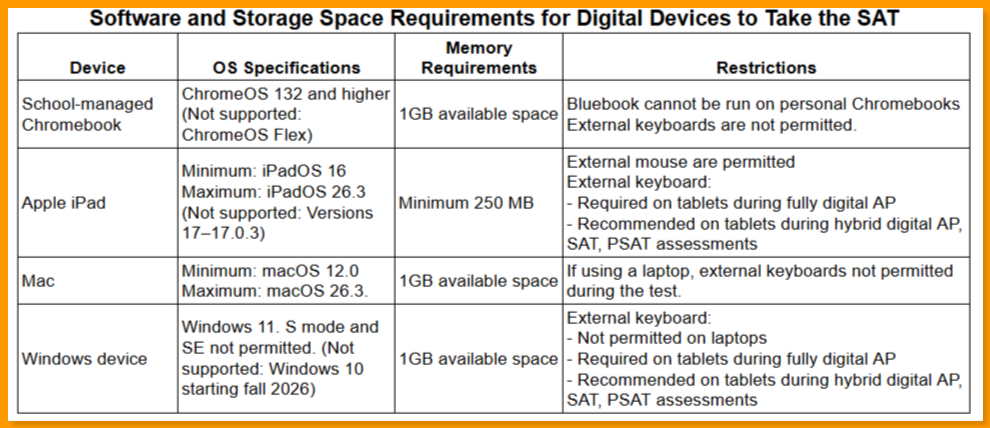
Currently, the Bluebook testing app can run only on:
School-managed Chromebook,
an Apple iPad,
a Mac laptop, and
a Windows laptop or tablet
Also, there are certain system requirements for these devices.
The below table explains the detailed requirements for devices that work with the Bluebook app SAT.
Alert:
Microsoft ended support for Windows 10 in October 2025. Bluebook acknowledges that the discontinued support poses a security risk. Hence, Windows 10 will not work for Bluebook, starting fall 2026.
Personal Chromebooks are not allowed to download the Bluebook app. If using a school-managed Chromebook, you might need to ask your school to help you with the download.
Note: For students using iPads to write an AP exam, an external keyboard will be required.
In case you try to download it on a device that doesn't meet the specifications, you’ll see the below message:
What's Inside the Bluebook App
For students taking the SAT, Bluebook contains timed and simulated full-length SATs, preview practice questions, analytics, learning tools, and study guides. When used thoughtfully, the Bluebook app will increase your confidence in facing the actual test and raise your chances of getting a higher SAT score.
Here are the four important areas of Bluebook that we’d recommend students pay special attention to:
1. Full-Length SAT Practice Tests
The adaptive SAT is quite unlike any paper-based test or even a non-adaptive test you might take on a computer. Hence it’s important that you experience the adaptive SAT, and that too with identical interface and format.
The Bluebook app offers you four SAT practice tests. Each practice test fully simulates the actual SAT. You will get to attempt questions of the same difficulty level as in the real SAT. You will also see firsthand how adaptive testing works on the SAT. At the end of each practice test, you’ll receive scores just like in the actual SAT.
Here's what your actual SAT scorecard may look like.
There’s just a small difference between an actual SAT and these full-length mock SATs. In the practice tests you may move to the next section even before the allotted time ends, if you wish. This is not possible in the actual SAT. Also, explore the key difference between a practice SAT and the real SAT.
There are a total of 7 full-length practice tests in the Bluebook. They are numbered test 4 through 10; tests 1 through 3 were retired. The tests that are retired were often considered unrealistically easy. The new full-length tests are of adequate difficulty level. Additional full-length mock SATs are available on EdisonOS.
For many students these tests may not be adequate to cover the gap between where they currently are and their targeted score. EdisonOS offers you 22 full-Length SAT mock tests, which ensures nothing is left out from practice.
Are Bluebook Practice Tests Adaptive?
Yes, the full-length practice tests in the Bluebook app are fully adaptive. They follow the exact multi-stage adaptive algorithm of the actual SAT.
That means that the first module will have a mix of easy, medium,and tough questions. If you do well in the first module, the second module will have mostly tough questions. Otherwise, the second module will have mostly easy questions.
2. Test preview questions
The Bluebook provides these pretest questions to acquaint you with digital testing fully. They are not meant to give you practice in any of the sections per se.
Hence, test preview questions work differently. Firstly, they aren’t full-length tests - they are only a small set of questions. Secondly, they aren’t timed; you may take however long you wish.
And finally, the app doesn’t score you for these questions. Hence, after you’ve completed attempting these questions, you won’t know how you fared (which is ok, since the goal of these questions was to familiarise you with the digital testing).
3. Bluebook Analytics
The CollegeBoard testing app will show you your performance in the full-length tests. You will be able to see how you’ve fared and track your overall performance. You’ll also find your performance for individual questions.
The analytics will also tell you how you did in each of the sections and subject areas. That will help you identify your strengths as well as areas for improvement. Finally, you’ll get to see your scores across different levels of difficulty. That will help you refine your strategies.
While there’s certainly some room for improvement, these analytics are certainly a help in absence of better, more detailed insights. EdisonOS's Bluebook Insights tool provides deeper analytics than what Bluebook natively shows. EdisonOS displays your accuracy by skill as well as time spent per question. For every question, you get a detailed explanation on why a particular answer choice was correct and what made the remaining choices incorrect.
4. Tools and Flashcards
The student testing app comes with a set of learning tools that include video lessons and flash cards. While you cannot use these tools to replace your full-fledged SAT test-prep, they are a great way to supplement your preparations.
The video lessons cover different subject areas that the SAT tests you for. You may find them useful in understanding concepts you aren’t sure of.
On the other hand, flashcards serve as memory-boosting devices, especially for vocabulary and numerical concepts.
How to Check Your Practice Test Score in Bluebook
The Bluebook maintains and displays a clear record of your performance for each of the full-length practice SATs you take in the Bluebook.
Here is how you can view your scores in your Bluebook app:
The test auto-saves your progress. At the end of the test, you will be automatically directed to your scores.
If you wish to check your past score, log into your College Board account with your Bluebook credentials.
Head to the ‘My SAT’ section. You’ll find the scores of all the practice tests you’ve taken till now.
When you click upon an individual test, you’ll get to see a detailed breakdown of sectional scores, and even a questionwise report of whether your response was correct or incorrect.
Bluebook In-app Tools: What You Can Use During the Test
The Bluebook testing aims to replicate the exact test interface. Hence, everything that you see during the real SAT, including the in-app tools, is available during the Bluebook SAT practice tests.
Here are the Bluebook in-app tools that you can use during the test (Remember that the availability of a tool is determined by which tools are permitted during a particular section):
Timer: You will be shown a countdown clock that shows the time remaining. You may stop the clock being displayed if you wish. However, it will automatically turn on when you have 5 minutes left in the module.
Text Resizing: You can zoom on a part of the screen and resize text size for better readability.
Desmos Graphing Calculator: The integrated calculator allows you to evaluate expressions and plot charts and tables, in addition to carrying out regular calculations.
Question marking: You can flag questions that you can review later on. On the top of the screen, you’ll see color-coded indicators which show which questions are flagged, unanswered, or answered.
Formula Sheet: You can access a sheet that has essential geometric formulas and mathematical constants.
Eliminator: This tool lets you cross out or even entirely hide one or more of the options in multiple-choice questions. That will make it easier for you to focus on the remaining choices without being distracted.
Annotations: You may use this tool to highlight specific text within reading passages, when you think that part of the text is somehow key to the question.
Assistive technologies: You get built-in support for screen readers, speech-to-text, and color contrast adjustments. Such tools are meant for students with special requirements.
Line reader: This tool lets you highlight a particular line. You may use it like a digital ruler that you can push up or down to focus on a particular line and ignore the rest.
The full-length mock SATs from EdisonOS have an authentic Digital SAT interface - screen-by-screen Bluebook replica. Besides, all the official tools like the on-screen calculator, reference sheet, highlighting tool, etc. are available in EdisonOS practice SATs.
Bluebook Feature Updates 2025-26
We’ll list out the Bluebook SAT updates, starting with the most significant ones:
Updated Os requirements: The system and memory requirements for various devices have been revised.
Dual-mode calculator: Students can easily switch between graphing and scientific calculating options.
Accidental exit protection: Exited the test by mistake? The test timer pauses for a limited time window, effectively letting you get back and restart without loss of time.
Accessibility: Text-to-speech options have been upgraded.
Additional tests: Test numbers 7 to 10 have been newly added.
How to Use the Bluebook App for SAT Prep
Using the Bluebook app for the SAT won’t take much getting used to. Things are simple and intuitive, so you can easily start. Here’s how it will go.
First, make sure you have the device with the right specifications. After you've downloaded the app, you need to complete the registration process and create an account. You’ll need an account to begin using the app and start exploring its features.
Getting Familiar With the Bluebook Interface
Next, familiarize yourself with the digital testing structure breakdown - the interface, tools, and all that. This is best done through the Test Preview questions. Remember, they aren’t graded or timed, so spend some time making yourself comfortable with the digital testing style that the CollegeBoard uses for the SAT.
Starting Your SAT Preparations With Bluebook
Ideally, you should take the Diagnostic Test from the app as your next step. That will tell you a great deal about where you stand in your preparations, your familiarity with how the adaptive SAT works, digital testing, and so on.
Using your performance on the Diagnostic Test, the testing app will recommend a study plan for you. If there’s a tutor who helps you with the test-prep, it’s a good idea to discuss this study plan with them and improve it. Remember, there are learning aids (like videos and flashcards) within the app that you can use.
Reviewing your performance
Once you’re confident about your preparations, take the first of the practice tests within the app. Review your performance using the analytics that the app provides. That way, you’ll be able to spot areas you need to improve in order to get a good SAT score.
Continue working on your preparations and taking the practice tests, focusing on pacing the SAT based on your performance and your study plan. This loop will ensure you're constantly improving your scores.
Along the way, don’t forget to make most of the community of test-takers that the Bluebook will let you access. Communities like this allow you to exchange experiences, share tips, and learn from one another. Such interactions can be important in maintaining focus and momentum in order to successfully prepare for the SAT.
What's NOT in Bluebook
The Bluebook offers the basic level of everything that you need to familiarize yourself with the SAT and its interface. However, once you are done with the tests, you realize that you’ll need more mock SATs, along with the exact same test interface and in-app tools.
In particularly, the Bluebook does not have:
Further tests
Supplemental material
Strategies
Insights on where you lack and what you should focus on
Targeted practice drills
Additional material to reinforce your skills with
That’s why students turn to EdisonOS. The exact test interface, questions of identical difficulty level, the adaptive test algorithm, … all this and more. EdisonOS offers you 22 mock SATs, more than adequate for extensive practice, ensuring you reinforce every strength and address every single weakness.
How to Complete Exam Setup and Get Your Admission Ticket
Five days before the actual test date, your device is ready for the final setup for the actual SAT. Follow the steps below to complete the setup and generate your admission ticket.
From the device that you intend to use on the test day, log into your College Board account.
Navigate to ‘Your Tests’ and your upcoming SAT.
The next screen will show you the simple steps to perform in order to verify system requirements and complete the setup.
After the setup is completed, the app will generate your admission ticket.
Check all the details on the admission ticket.
Save a copy of the admission ticket on your mobile or take a printout.
You're taking the same device that you've downloaded the app on,
You're carrying along a charging cable or a portable charger,
Your device can connect to a Wi-fi, and
Your device is fully charged
How EdisonOS Empowers Tutors for Digital SAT Success
EdisonOS is a purpose-built Digital SAT platform designed for tutors to craft high-quality practice tests, simulate the official exam environment, and access powerful student performance analytics.
Since the Digital SAT's complex scoring system considers both question difficulty and correctness, tutors need sophisticated tools to prepare students effectively and demonstrate measurable results.
Why Tutors Choose EdisonOS:
Expert-Vetted Content at Scale: Access 3700+ SAT experts-vetted questions and 22 expert-designed adaptive tests, helping tutors boost student scores by 200+ points
Build Your Own Test (BYOT): Build a Bluebook-style test targeting only your student's weak Math skills in under 15 minutes. And because it precisely mimics the test-taking experience, the outcome is clinically effective.
Authentic Test Environment: Mimics the Bluebook interface to reduce test anxiety and familiarize students with the real test format, ensuring students are comfortable before test day
Data-Driven Insights: Detailed breakdown of student performance where every second spent is analyzed, with tutor-centric tools to manage multiple students, track progress, and create personalized study plans with ease
Ready to transform your Digital SAT tutoring? Join thousands of tutors using EdisonOS to deliver measurable results and help students achieve their target scores.
Frequently Asked Questions
Where can I download the Bluebook app for SAT?
Can I download Bluebook on Mac?
Why can't I download Bluebook on my Chromebook?
How many Bluebook practice tests are there?
How do I access my digital practice tests on Bluebook?
What happened to Bluebook Plus?
ABOUT THE AUTHOR
Mayank Batavia
Content Strategist
Mayank Batavia is a freelance content strategist and content writer who writes mostly for tech companies. His background in coaching helps him study and analyse training systems and solutions. He loves memorizing trivia, watching old Westerns, and trying NYT crosswords that he can rarely solve.
Tutors Edge by EdisonOS
Get Exclusive test insights and updates in our newsletter, curated to help tutors stay ahead!
Thanks for subscribing! The 'Digital SAT Breakdown Report' has reached your inbox!
Oops! Something went wrong while submitting the form.












.png)
.webp)
